

RedAlert MDT
The mobile CAD software your crew needs
The seconds between dispatch and arrival are when most of the decisions get made. RedAlert MDT puts live CAD data, custom mapping, and preplans on every apparatus tablet, so crews arrive knowing the building layout, water supply, and risks instead of sorting it out on scene. And when the call winds down, the report starts on the same screen.
Arriving blind is the default problem for most apparatus crews. Everything gets sorted on scene. RedAlert MDT changes that with a structured CAD data feed delivered straight to the apparatus tablet: call details, status updates, and unit assignments displayed on screen at all times instead of relayed over the radio. No relay errors, no “say again.”
The tablet keeps working after the call goes quiet. While your crew is on the side of the road waiting on the tow truck or the cleanup crew, someone can start the report right there on the MDT. Times, units, and call details are already on screen, and what they enter lands in RedAlert for an officer to review and submit. That's twenty minutes of dead time on scene turned into a report that's most of the way done before the rig is back in the bay, instead of a blank screen waiting at the station at eleven at night.
See the capability behind this product: CAD Interface · Alerting & Mobile Response · Pre-Incident Planning & Mapping.
A look at RedAlert MDT
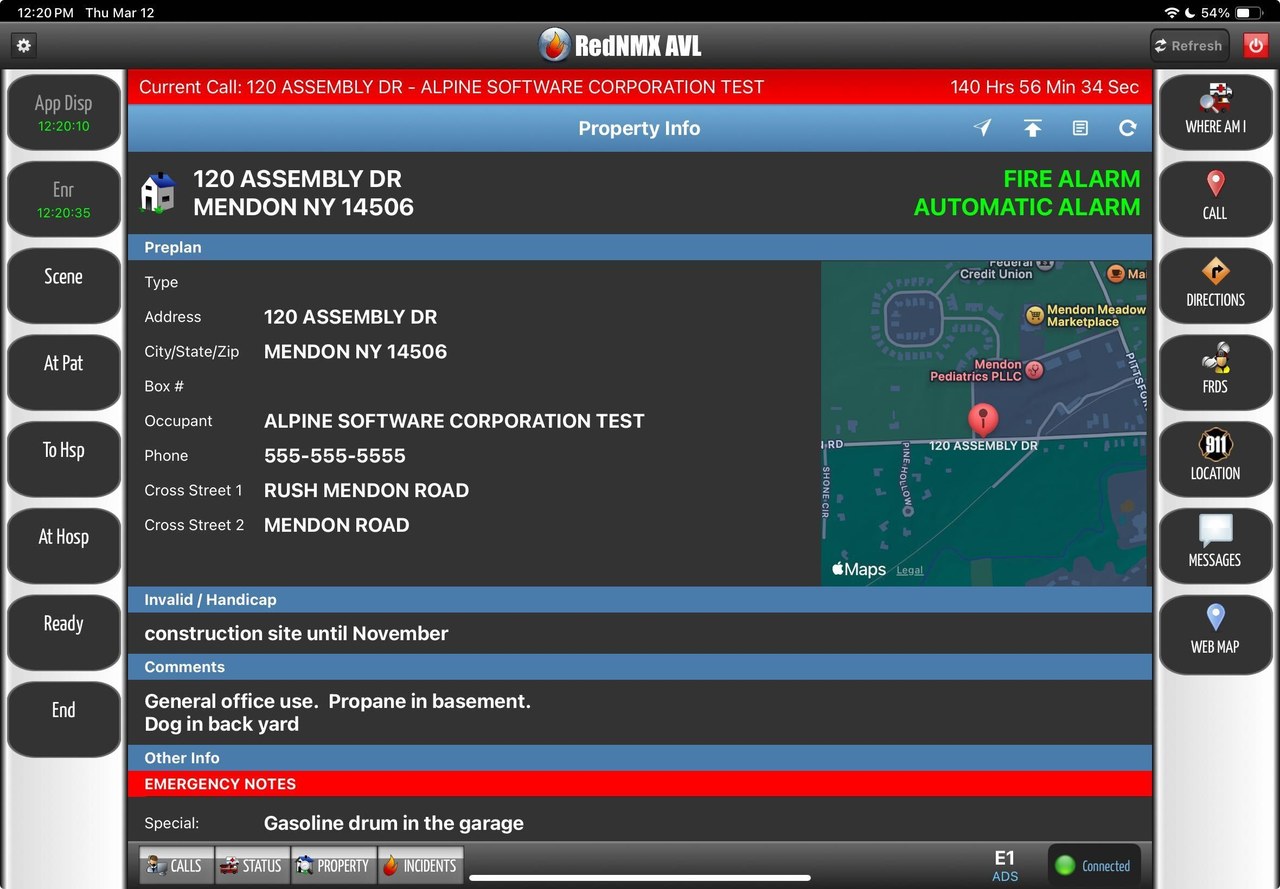
See it in action
What RedAlert MDT does
- Live CAD integration replaces radio relays: call details, statuses, and unit assignments on screen
- Custom mapping layers: plot your own hydrants, FDCs, and points of interest
- Preplans en route: hazards, utility shut-offs, and site plans visible before arrival
- NERIS reports started right in the MDT app, landing in RedAlert for an officer to review and submit
- Runs on every apparatus tablet, keeping all responding units equally informed
Common questions
What is an MDT in a fire apparatus?
A mobile data terminal: the tablet or laptop mounted in the cab that shows the crew dispatch information, mapping, and preplans on the way to a call. It replaces relaying that information over the radio. RedAlert MDT is Alpine Software's, and because it runs on the same platform as your records, the preplans and hydrants it shows are the ones your own department maintains.
Can we start reports from the MDT?
Yes, right in the MDT app. The call is already on the screen with the times and details filled in, so a crew member with the correct security permissions can start the NERIS report while they're still on scene, which is usually where the dead time is: waiting on a tow, waiting on the cleanup crew, waiting on the utility. What they enter lands in RedAlert for an officer to review and submit. Departments that do this consistently find reports go out faster and come back cleaner, because nobody is reconstructing a call from memory three days later.
Can we put our own hydrants and points of interest on the map?
Yes. Departments plot their own mapping layers: hydrants, FDCs, draft sites, gates, and any other local knowledge worth having on screen at 3 a.m. Whatever your department maintains in RedAlert is what the crew sees en route.
What hardware does RedAlert MDT run on?
MDT is designed for tablets mounted in the apparatus. Departments typically run ruggedized Windows tablets, iPads, or Android tablets. It needs an internet connection via Wi-Fi, Cradlepoint, or cellular.
Does RedAlert MDT require a CAD interface?
Yes. The live dispatch feed is what makes an MDT an MDT, and that comes from an interface to your dispatch center's CAD system. Alpine builds and maintains that interface as part of the MDT deployment, and we've connected to most of the major CAD platforms in use today. The rest of what's on the screen (mapping, hydrants, preplans, hazards, and staffing) comes from your own RedAlert records, which means the more your department maintains in RedAlert, the more useful the tablet becomes.
We already have Responder on everyone's phones. Why add MDT?
They solve different problems. Responder is about turnout: alerting members wherever they are and showing command who's coming. MDT is about the rig: a mounted screen the whole crew can see, with mapping, preplans, and CAD status in front of them for the entire response instead of on a phone in someone's pocket. Departments running both give members the alert on the way to the station and the full operational picture once they're on the truck.
Can the MDT send status updates back to dispatch?
Technically yes, and we've built it. In practice, most dispatch centers won't approve it. Writing data back into CAD means opening an inbound interface to a public safety system, and dispatch IT teams are, reasonably, cautious about that. It's worth asking your dispatch center early if it matters to your department, because the answer is theirs to give, not ours. In our experience, the vast majority of departments run MDT as a receive-only feed and lose nothing operationally, since crews are already marking status on the radio or in Responder.
Works with the rest of the RedAlert family
Every product syncs into the same database. That's what all-in-one means.
See RedAlert MDT in action
A real walkthrough with a real person, shaped around how your department runs.